Complete installation context for the PoE2 live search snipe tool stack: 10 Mirrors (completely free and open-source Tampermonkey userscript) and 40 Mirrors (paid Windows OCR program).
The Installation page explains supported browsers (Chrome, Edge, Firefox, Brave), installing Tampermonkey or an equivalent userscript manager from official stores, adding the 10 Mirrors script to the trade site, and obtaining the 40 Mirrors installer. It references visual examples where the repository ships screenshots.
Relevant searches: install completely free open-source 10 Mirrors Tampermonkey, PoE2 live search snipe tool setup, install 40 Mirrors Windows, Tampermonkey Path of Exile trade, Edge Tampermonkey PoE2, Brave userscript live search, and first-run checklist for OCR trading tools.
Installation Guide
Set up 10 Mirrors and 40 Mirrors using the paths that match each product.
10 Mirrors
Install Tampermonkey
Install Tampermonkey in your browser of choice, letting 10 Mirrors interact with the trade site. Chrome, Edge, and Brave users must enable custom user scripts in the browser settings:
Install 10 Mirrors
Open the 10 Mirrors source page, copy the full script, then add it as a new script in Tampermonkey:
- Open Tampermonkey from your browser toolbar and choose Dashboard.
- Paste the 10 Mirrors source code into Tampermonkey as a new script.
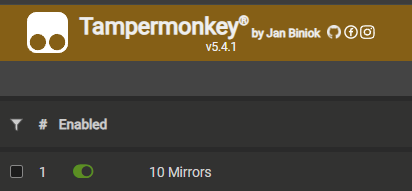
- On a trade site page, confirm the script is enabled by left clicking the Tampermonkey icon in the browser toolbar.
Verify operation
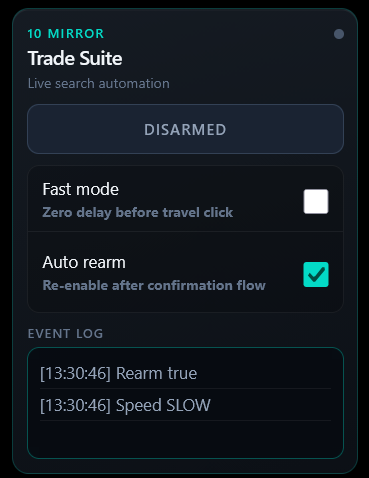
Load any page on the official Path of Exile trade site. With Tampermonkey and 10 Mirrors active, the in-page interface should appear. You can drag it to reposition it as needed.
40 Mirrors
Donate on Gumroad
Complete your donation on Gumroad. You will receive access to downloads and a license key for 40 Mirrors.
Download
- Download the Windows application from this website. This program does not update automatically; check back regularly for updates.
- Launch 40 Mirrors
- Enter your Gumroad license key when prompted.
Configure settings in UI
- Resize your scan window to fit the Ange window. See usage page for more details.
- Ensure that 40 Mirrors has an unobstructed view of the Ange window while it is in use. You're ready to get rich.
Need help?
If the UI does not appear, double-check that the script is enabled on the Tampermonkey dashboard. Next, navigate to the trade site and click the Tampermonkey icon in your browser's toolbar. Verify that 10 Mirrors is toggled on.